


What's new in Cursor
Cursor for iOS: Build from anywhere with the Cursor mobile app. You can launch always-on agents, or remote control agents running locally on your computer. Get live updates and ship PRs directly from your phone.
Cursor Git Hosting: Origin is our git hosting platform, designed for agent speed, volume and scale. It will be generally available this fall, but you can join the waitlist now.
Organizations and teams: Cursor Enterprise admins can now manage multiple teams under a single organization with different security, governance, budget, and feature controls for each.
Auto-review: A new run mode that lets Cursor work longer with fewer interruptions and safer execution. To try it, adjust your run mode in Settings → Cursor Settings → Agents → Approvals & Execution.
Shared canvases: Agents can create shared team artifacts such as reports, dashboards, and custom interfaces. View team canvases with read-only access in the Cursor Dashboard.
/loop skill: With /loop, Cursor can run a prompt repeatedly on a local schedule until a certain outcome is achieved. This allows agents to handle recurring tasks like "check deploy status every 5 minutes."
Highlight from the Cursor Team
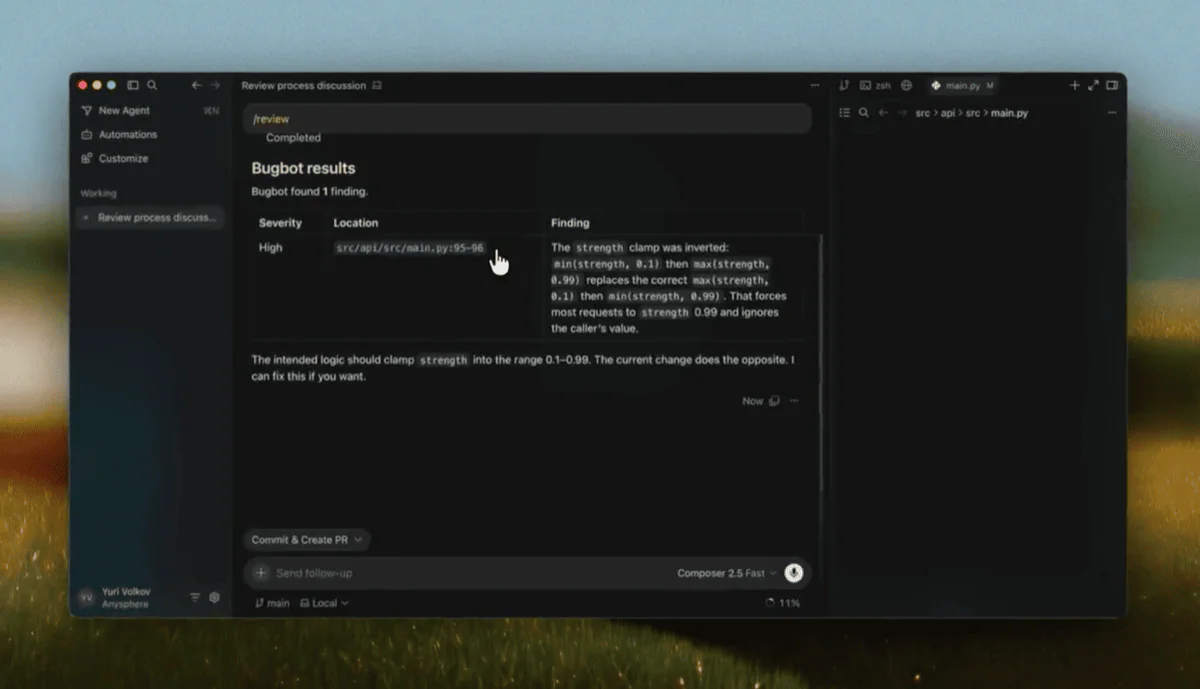
Bugbot is Cursor’s code review agent that catches issues in your PRs before merge. This month it got 3x faster, ~22% cheaper per run, and 10% sharper.
Bugbot is especially useful for reviewing before you push changes. At Cursor, we use /review to trigger Bugbot to spot and fix issues before they become comments.
A great place to start: run /review on your next change.
Learn how others are using Cursor
Build from anywhere with Cursor for iOS
Learn how the Cursor team is using the mobile app to ship work when they’re away from their desks.
How Notion used the Cursor SDK to embed coding agents
A look at how Notion built programmatic agents on the Cursor SDK.
Download Cursor · Use Cursor in browser · Docs · Workshops. © 2026 Anysphere, Inc. San Francisco, CA. Unsubscribe