

Introducing Cursor Router
Cursor Router, our intelligent model router, is now available for Teams and Enterprise.
Cursor Router analyzes each request and routes to the best model for the job: frontier models when the work demands them and price-efficient models when it doesn't.
Routing requests
With Cursor Router, your team can:
- Call the right model for each task, every time.
- Optimize routing with three modes: Intelligence, Balance, and Cost.
- Cut spend without cutting quality.
In early access, teams saved 30-50% using Cursor Router vs. routing all requests to Opus 4.8
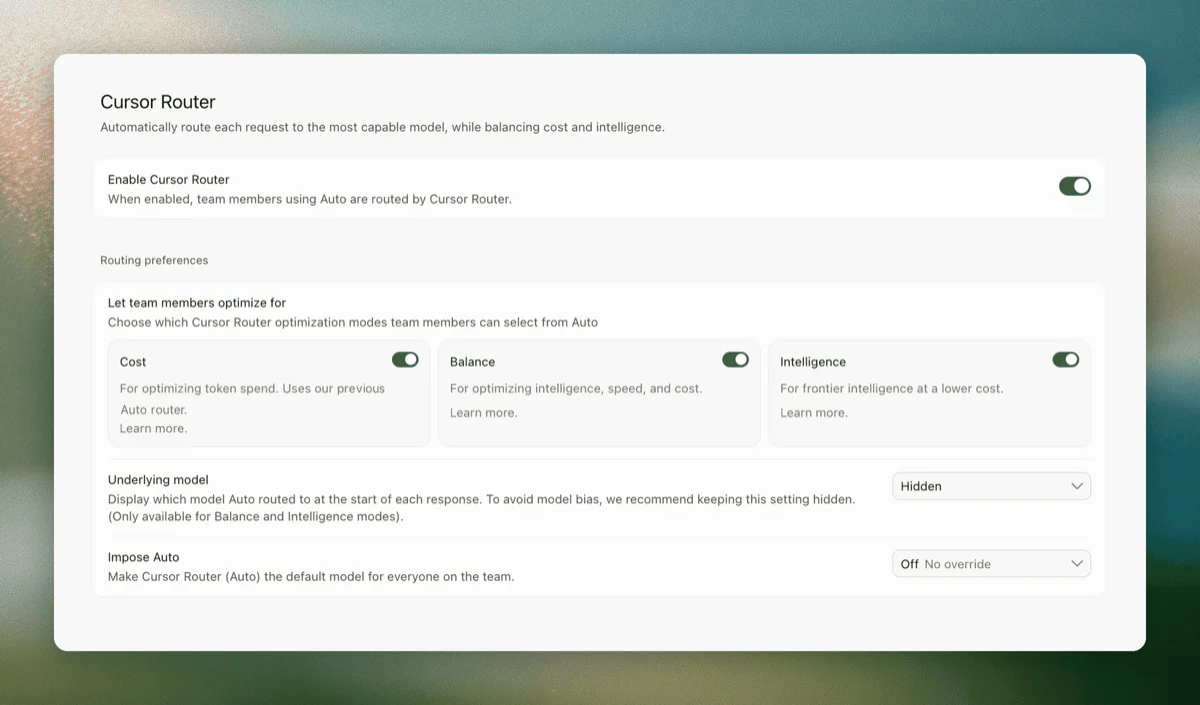
Admin controls
As a team or enterprise admin, you can:
- Enable or disable Cursor Router per team or group from the dashboard, on by default for Teams plans.
- Restrict which optimization modes members can use: Cost, Balance, Intelligence.
- Set soft or hard enforcement for Auto mode: soft defaults new chats to Auto; hard locks the picker to Auto.
- Display or hide the routed model for members (hidden by default)
- Allow or block models, Grok 4.5 is required so the router has a price-efficient model to route to.
Cursor Router is generally available today and works across desktop, web, iOS, CLI, and our SDK. Learn more in the docs , changelog, or in our announcement below.
Introducing Cursor Router →
Download Cursor · Use Cursor in browser · Docs · Workshops. © 2026 Anysphere, Inc. San Francisco, CA. Unsubscribe